


2026 AI Image Describer: The Most Comprehensive Review
You're probably familiar with image generators, but have you heard of image describers? In short, an image describer uses AI to automatically generate text descriptions for images. If you're interested, this article will provide a comprehensive review of the image describer, giving you a deep understanding of its definition, features, and similar online image describers available.
- • Part 1: Questions and Answers about AI Image Describer
- • Part 2: Limitations of AI Image Describer [Real Test]
- • Part 3: What are Some Alternatives to AI Image Describer
- 1. Vidnoz
- 2. DescribeImage.ai
- 3. Foundmyself
- 4. PICS.IO
- 5. ChatGPT
- 6. Midjourney
- • Part 4: How to Recreate Images Using the Generated Text
- • Part 5: FAQs about Image Describer
Part 1: Questions and Answers about AI Image Describer
Question 1: What does This Image Describer Do?
- 🔗Official website: https://imagedescriber.online/
- 📝Definition: This image describer is an AI tool that generates detailed descriptions or explanations based on images or pictures. Simply upload your image, select an intention template, modify or add additional information, and submit for analysis. Finally, you'll receive a comprehensive description of the image's content.
Question 2: What Kind of Descriptions can it Generate?
- This image describer can provide detailed descriptions of objects, scenes, atmosphere, emotions, and composition in an image. It can create stories from images, describe fashion outfits, generate sales titles or marketing copy for product images, and even give you suitable social media titles or text for images you want to share.
- You can describe images using custom prompts or templates, and the AI will strive to generate descriptions based on your specific intentions, offering a high degree of flexibility and ensuring the results match your expected image descriptions.
Question 3: Can I Use it to Add Captions to Social Media Images?
- Of course you can. This is one of its distinctive features. It can describe social media images and generate explanations for works of art. Let me show you how it works.
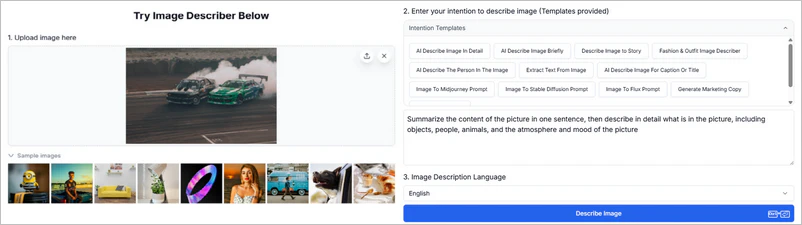
- Step 1: Click to enter https://imagedescriber.online/.
- Step 2: Upload one of your social media photos and enter a prompt, or you can use a template directly.
- Step 3: Confirm the output language and then click "Describe Image" to get the results.
Question 4: Can it Help Visually Impaired People Understand the Image?
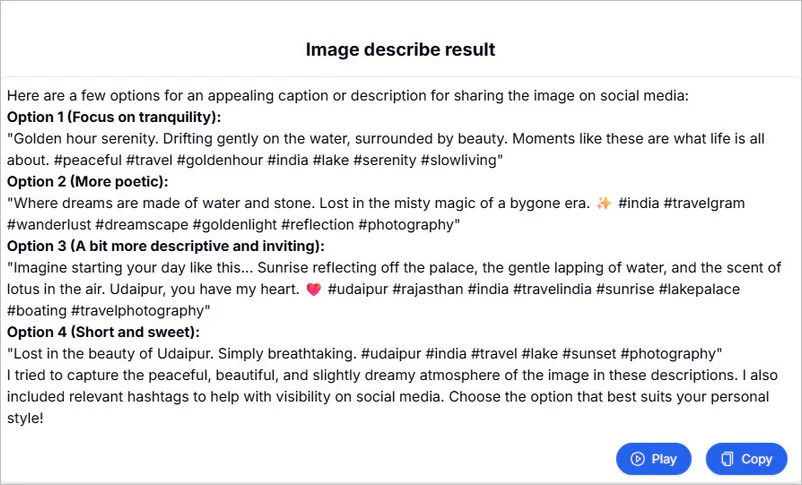
- Absolutely. It has a "Play" button that plays text, helping visually impaired people "hear" the content of the pictures. If you have visually impaired friends, you might want to try sharing this tool with them.
Question 5: Which Languages And Image Formats does It Support?
- JPG, PNG, WebP, and GIF files are all acceptable. Currently, it is known that the imagedescriber.online website can output 14 languages, including English, Chinese, French, and Spanish.
Question 6: Can it Describe NSFW Content?
- We tried uploading a violent oil painting and asking it to describe it, and it was indeed able to output text according to our requirements. But we do not recommend uploading NSFW content that is excessively nude or exposes privacy to the website, as this carries the risk of data leakage.
Part 2: Limitations of AI Image Describer [Real Test]
Limitation 1: 3 Free Uses with Restrictions on Image Size and Format
- You only have three free uses. The website requires uploaded images to be less than 5 MB, and the format must be JPG, PNG, WebP, or GIF. Only one image can be uploaded at a time. This means you may need to manually compress the images before uploading them to the website.
Limitation 2: You Cannot Control the Word Count or Style of the Text
- You can instruct it to simplify the description, but you can't be precise down to the word count. Regarding text style, you can input different intentions, but there may be inaccuracies.
Limitation 3: Premium Features Require Payment
- After three free uses, you need to purchase credits, which can be used to unlock features such as bulk image describer, chat with image AI, and image to tag generator. Here is the price list.
| One-time payment | Monthly subscription |
| $9.99/150 credits | $9.99/200 credits |
| $19.99/400 credits | $29.99/1500 credits |
| $29.99/750 credits | $49.99/5000 credits |
Part 3: What are Some Alternatives to AI Image Describer
As of January 2026, there are already many professional image describers available on the internet. If you're not satisfied with just "/imagedescriber.online/", then check out the following similar online image describers.
| Supported Format | Free or Not | Image Restrictions | NSFW Content | |
| Vidnoz | PNG, JPG, BMP, WEBP | Free | Up to 20MB | ✔ |
| DescribeImage.ai | JPG, PNG, GIF, WEBP, BMP, HEIC, HEIF | Free | 10MB (guest) 20MB (logged in) |
✔ |
| Foundmyself | JPG, PNG, GIF, WEBP | 5 free uses | Up to 5MB | ✔ |
| PICS.IO | JPG, PNG, JPEG, WEBP | 5 free uses | Up to 10MB | ✔ |
| ChatGPT | Most image formats are supported | Free | ❌ | ❌ |
| Midjourney | JPG, PNG, JPEG, WEBP | Paid | Up to 10MB | ❌ |
1. Vidnoz
🔗Official website: https://www.vidnoz.com/ai-image-describer.html
🏷️Introduction: In addition to describing images with text, the Vidnoz AI image describer integrates text extraction, product descriptions, and question answering within images, covering a variety of image scenarios. Although the website claims an accuracy rate of up to 95% for its text descriptions, the AI's understanding and description may still be inaccurate for extremely complex or specialized images.
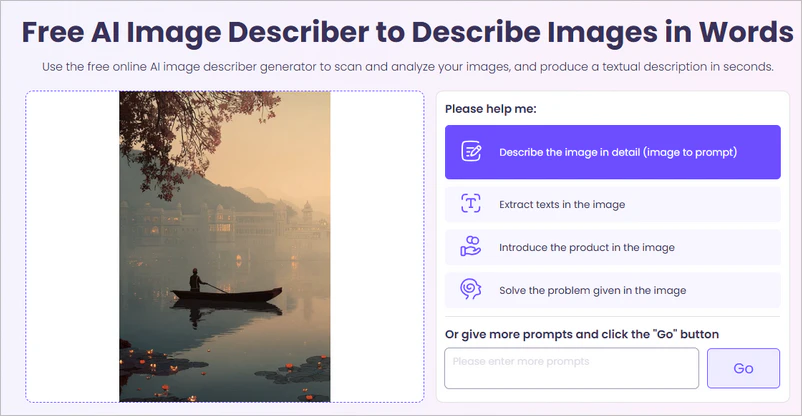
- Step 1: Visit the website and click to upload or drag and drop images into the designated area.
- Step 2: Choose from preset options (such as "Describe the image in detail" or "Extract text in the image"), or enter your own custom prompts.
- Step 3: Click the "Go" button, and the AI image describer will begin analyzing the image.
2. DescribeImage.ai
🔗Official website: https://describeimage.ai/
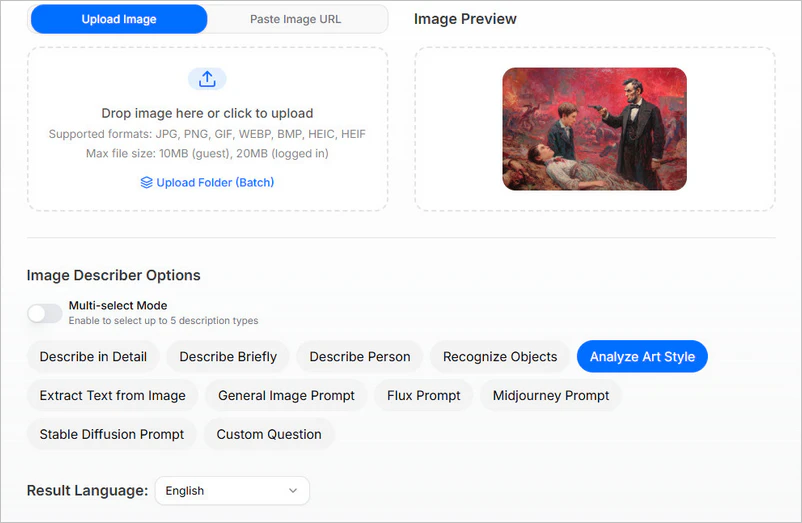
🏷️Introduction: DescribeImage.ai image describer can analyze uploaded images or image links you provide. It supports 7 formats: JPG, PNG, GIF, WEBP, BMP, HEIC, and HEIF, and offers 11 description types, including "Describe in Detail", "Recognize Objects", and "Analyze Art Style". The output text is available in 12 languages. However, unregistered users are limited to 10MB file size, while logged-in users can upload up to 20MB. Batch image processing requires purchasing additional points.
- Step 1: Click to select an image file from your computer. You can also paste the image URL directly.
- Step 2: Select image describer options; after enabling "Multi-select Mode," you can select up to 5 options simultaneously.
- Step 3: Select your desired language from the "Result Language" dropdown menu. Finally, click "Generate," and the AI will automatically analyze and generate the descriptive text. You can then read or copy the results directly.
3. Foundmyself
🔗Official website: https://www.foundmyself.com/tools/image-description-generator?
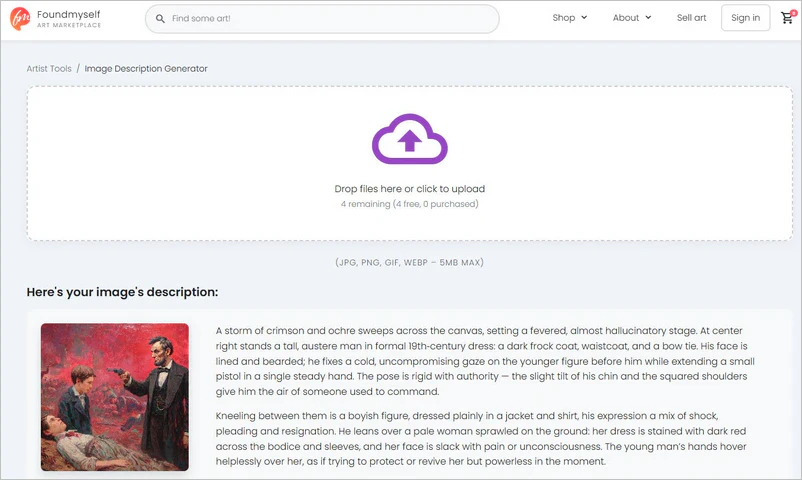
🏷️Introduction: Foundmyself AI image describer is very easy to use and doesn't require you to input text prompts. Simply upload an image, and it will quickly generate the corresponding text description. Although there is a "Settings" option on the page, it doesn't show specific adjustable parameters (description text, style, etc.), so the description results may be relatively fixed.
- Step 1: Open the provided website link using your browser.
- Step 2: Locate the box in the center of the page that shows "Drop files here or click to upload".
- Step 3: After uploading, the system will automatically begin processing. Within seconds, the description will appear in the "Here's your image's description:" section below the upload area.
4. PICS.IO
🔗Official website: https://pics.io/image-description-generator
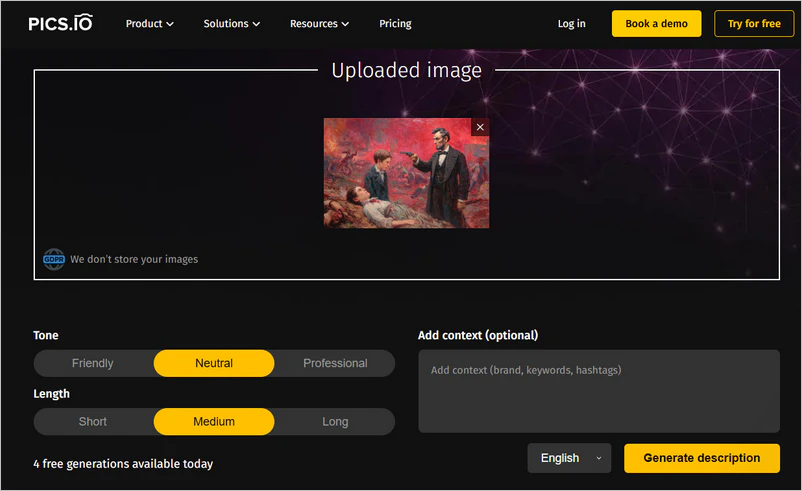
🏷️Introduction: PICS.IO image describer directly generates descriptions, titles, and keywords, and supports exporting to JSON or CSV files. The website explicitly states that images are deleted immediately after processing and are not stored. Although it's free to use, free users can only process 5 images per day, and must upload them one by one.
- Step 1: After visiting the website, simply drag the image into the designated area.
- Step 2: Choose the tone (friendly, neutral, or professional), text length (short, medium, or long), and language (English, Deutsch, or French).
- Step 3: Clicking "Generate" will generate three parts: "Description", "Title", and "Keywords". You can directly copy the text you need, or click the "Export" button to save all results to your local computer as a JSON or CSV file.
5. ChatGPT
🔗Official website: https://chatgpt.com/g/g-ZO53wiYdM-describe-image
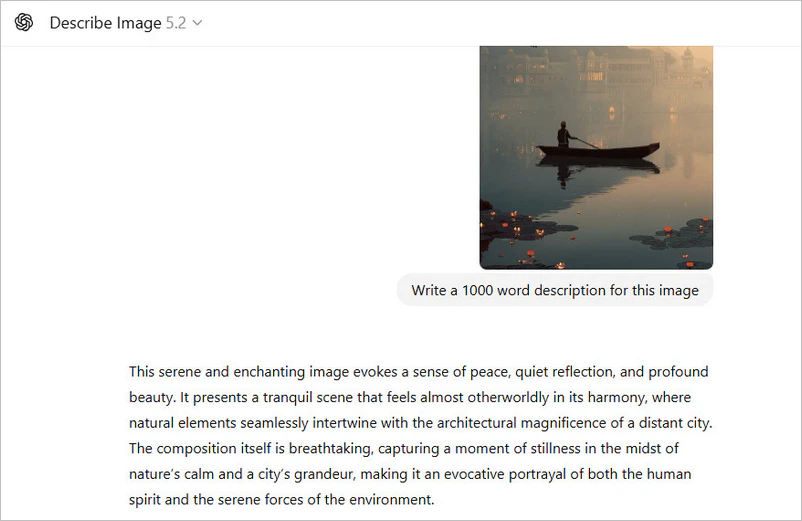
🏷️Introduction: You must be familiar with ChatGPT; it has many features, and you can definitely use it to generate descriptions for photos. Compared to Vidnoz, DescribeImage.ai, Foundmyself, and PICS.IO, ChatGPT image describer supports a wider range of image formats and has no image size limitations; you can upload any high-definition image or images larger than 20 MB. The only drawback is that in some regions, a VPN is required to successfully access the ChatGPT website.
- Step 1: Open ChatGPT and add the image in the input box.
- Step 2: Enter text commands, such as "50 word description for this image".
- Step 3: After sending the request, please wait for the results. Once the results are generated, you can also regenerate the text if needed.
6. Midjourney
🔗Official website: https://www.midjourney.com/
🏷️Introduction: Midjourney is primarily an AI-based text to image tool, but you can also upload images and have it generate 4 different text prompts. You can then use the generated text to create new images. While the five image describers mentioned above only support "image → text," the Midjourney image describer supports "image → text → image". However, it is somewhat expensive.
| Basic Plan | Standard Plan | Pro Plan | Mega Plan | |
| Monthly Price | $10 | $30 | $60 | $120 |
| Annual Price | $96 | $288 | $576 | $576 |
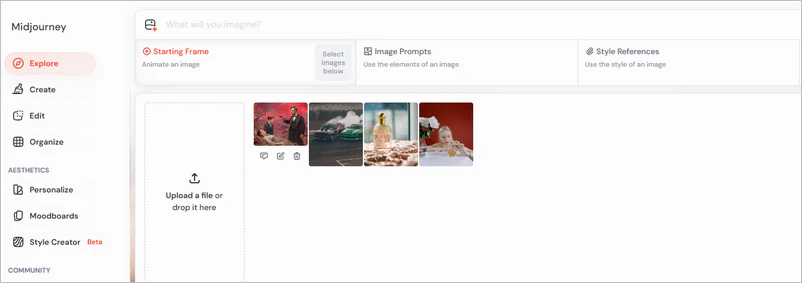
- Step 1: Visit the Midjourney website and log in to your account.
- Step 2: You can see an "Add Images" icon at the top of the website. Click it and import your images.
- Step 3: Move your mouse over the image you uploaded, and you'll see "Describe". Click it to start generating text prompts.
Part 4: How to Recreate Images Using the Generated Text
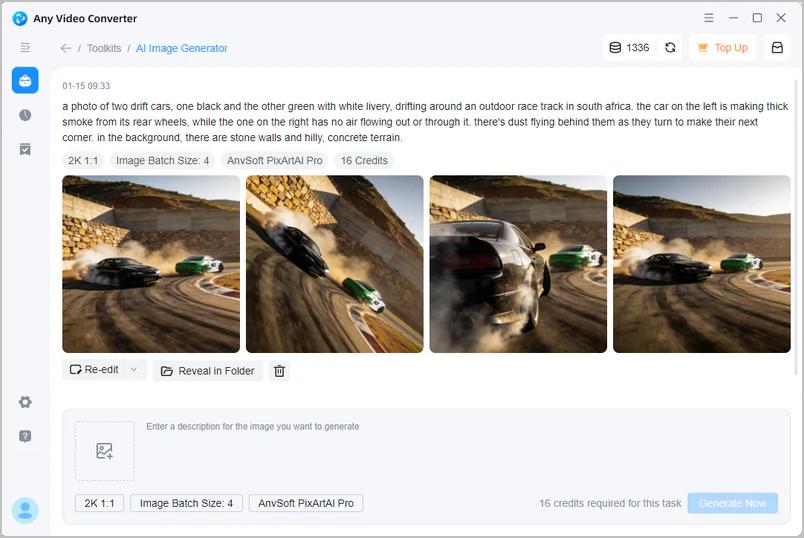
Besides converting images into text, wouldn't you like to generate images from provided text? Any Video Converter AI image generator uses a deep learning model to convert text to image. Based on the text description you enter, it automatically generates semantically consistent visual images, supporting realistic, artistic, abstract, and multiple styles, providing creative inspiration for designers, artists, and self-media creators.
- Quickly transform abstract concepts, story scenarios, or product ideas into visual images.
- Generate works in different art styles: realism, oil painting, cartoon, science fiction...
- From 720P to 4K image quality and batch image generation.

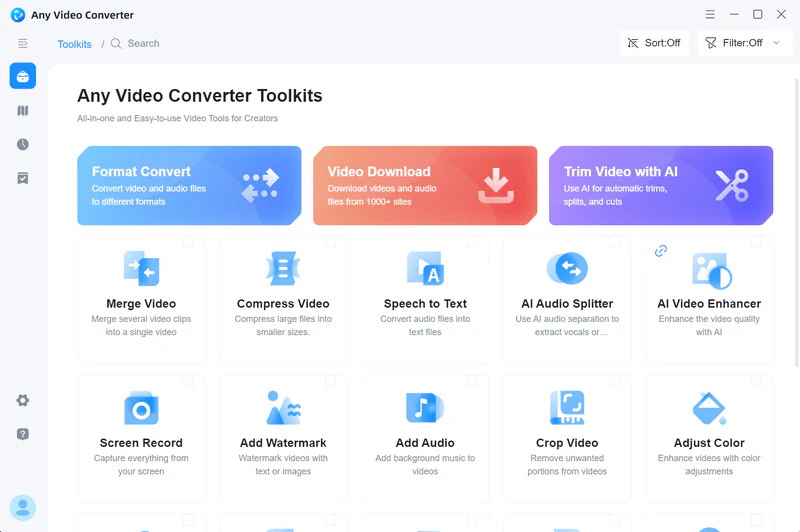
Open AI Image Generator in Any Video Converter
Enter a description or upload a reference image, then select the image quality and size. The more detailed the description, the more accurate the generated image will be.
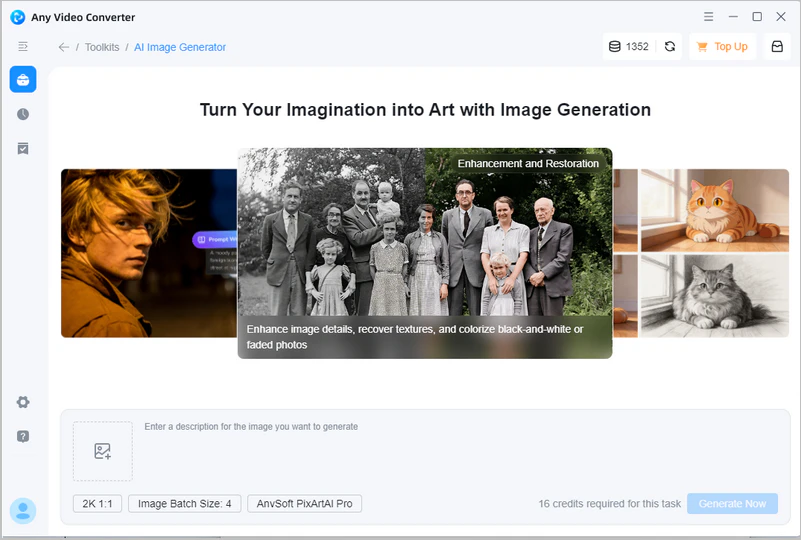
Generate AI Images
Click "Generate Now" to start generating the image. You can also re-edit the description and regenerate the image to achieve a satisfactory result.
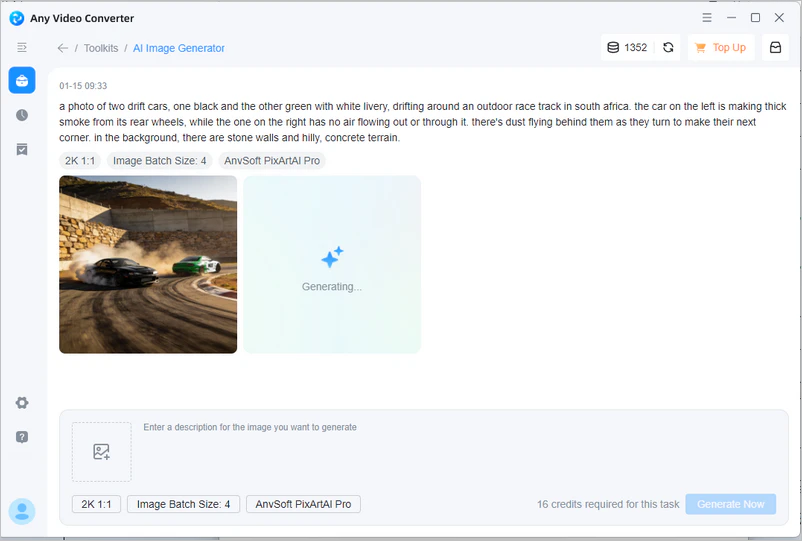
Save AI Images
After confirming the results, you can download the image to your device.
Part 5: FAQs about Image Describer
Q1: Can image describers read text?
Yes. Most image describers can read and extract text or keywords from images, but their accuracy may be affected by image quality, font, language, and background complexity.
Q2: Can Google describe an image?
Yes. You can describe images using Google Search, Google Lens (integrated into Camera, Google apps, or Chrome), Google Photos, and Google AI. Google not only describes images but also uses its deep analysis to help users understand the content behind visual information.
Q3: How accurate are image describers?
If the printed text in the image (document, road sign) is in good lighting and the font is standardized, the accuracy rate can reach over 99%. Image describers have high accuracy in recognizing everyday objects (cars, dogs, dining tables) and typical scenes (beach, meeting room). Low-resolution, low-light, blurry, or distorted images will lead to recognition failure. Artwork, satirical cartoons, and metaphorical images may be misinterpreted.
Q4: Does it support API integration?
The API documentation is available at /imagedescriber.online/, which you can read and view. We strongly recommend that you contact their customer service directly to inquire about the API.
Final Thoughts
From detailed scene analysis to creative text generation, from accessibility assistance to social media optimization, AI image describer still meets the needs of different users with its diverse features, despite some limitations in terms of free use, text control, and complex image understanding.
If you want to transform your textual inspiration into visual works after receiving an image description, then Any Video Converter AI image generator will be your powerful partner. It can intelligently generate high-quality, diverse images based on text descriptions, greatly improving creative flexibility and efficiency.
In the future, image describers and image generators are expected to become more intelligent, accurate, and user-friendly, further integrating into our digital lives and workflows. Hopefully, this article will help you find the AI tools that best suit your needs and unlock more creative possibilities between images and text.


Besty Smith | Content Writer
Besty Smith is a talented and insightful content creator with a keen interest and passion for software programs. She focuses on in-depth research and hands-on experience with various types of software, providing readers with in-depth and inspiring content through precise writing. With her keen insight into the software industry, Besty is committed to helping readers keep abreast of the latest industry trends so that they can stay competitive in the digital age.